NearStream 2K Webcam for PC, Full HD 1080P Webcam with Noise-Canceling Mic, Auto Focus,Software Control, Adjustable FOV, Plug&Play, Compact Web Camera for Desktop Computer for Zoom/Skype/Teams (V02AF) - style: 2K@30FPS,1080P@60FPS
About this item
- 【2K FHD Webcam for Video Calls & True Autofocus】: Equipped with a 2K FHD 2-megapixel CMOS sensor, the NearStream V02AF streaming webcam delivers crisp, clear video at resolutions up to 2K at 30FPS or 1080p at 60FPS. This computer camera for desktop features autofocus, ensuring your image stays sharp and clear no matter how you move, providing a professional look. It enhances video calls, streaming, and recording, making them easier and more reliable. Note: The webcam can be set to 1080p at 60FPS through the NearSync software.
- 【Software Defined V02AF with Adjustable FOV and Image Settings】: The NearSync software offers customizable field of view (FOV) options, allowing you to set it to 60°, 75°, or up to 95°. This adaptability ensures you can capture your environment ideally, whether for solo or group meetings. Additionally, you can adjust saturation, brightness, contrast, and hue to create sharp, vibrant images tailored to your preferences. Whether you're participating in a video call or producing content, you have full control over your visual presentation.
- 【PC Webcam with AI Noise-Canceling Microphone】: This computer camera with microphone for desktop features an HNR noise-canceling microphone that captures sound up to 10 feet away while filtering out background noise for clear audio. Your voice will be heard clearly even in noisy environments, making it ideal for professional video calls, online classes, and live streaming.
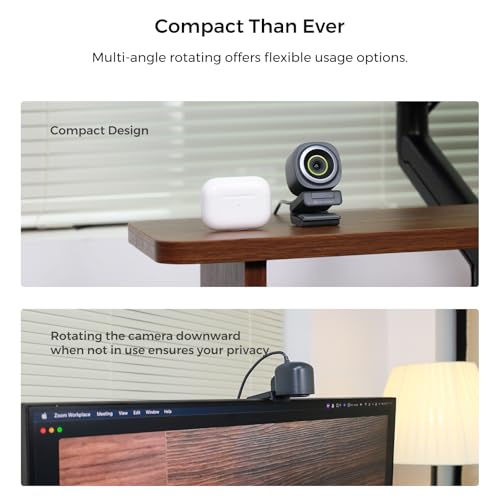
- 【Plug and Play & Flexible Mounting Options】: The web camera for laptop is user-friendly and requires no drivers—just plug the USB cable into your computer and select V02AF as your webcam. The adjustable mounting clip easily secures to your PC, laptop, monitor, or any flat surface. Plus, the base includes a 1/4" installation hole, allowing you to mount it on a desk stand, boom arm, or floor tripod for various setup options.
- 【Wide Compatibility】: The webcam for Mac works seamlessly with Windows, Mac, Linux, and Chrome OS systems, providing versatility across various platforms. It integrates smoothly with popular meeting software like Zoom, Microsoft Teams, Google Meet, Skype, Webex, and Slack. Additionally, you can utilize the V02AF webcam for streaming on YouTube, TikTok, Facebook, and Twitch. Ideal for online studying, teaching, and video calling, this webcam for laptop meets all your needs.
Overview
- Brand: NearStream
- Photo Sensor Technology: CMOS
- Video Capture Resolution: 1080p, 2K
- Maximum Focal Length: 3
- Maximum Aperture: 5 Millimeters
- Flash Memory Type: Memory Stick
- Video Capture Format: MP4
- Supported Audio Format: AAC
- Connectivity Technology: USB
- Color: Black
Couldn't load pickup availability
Low stock: 10 left
View full details

Reviews
-
⭐⭐⭐⭐⭐
Megan Foster — Seattle, Washington
I ordered a few setup accessories from Frameora, and they made my desk feel much more organized. The items were easy to use, practical, and helpful for improving my video calls and simple content recording. I would definitely shop here again. -
⭐⭐⭐⭐⭐
Ryan Miller — Austin, Texas
Frameora has a useful selection for anyone building a better camera or streaming setup. I liked that the products were straightforward, easy to install, and worked well with my everyday desk setup. Everything felt practical and well chosen. -
⭐⭐⭐⭐⭐
Olivia Bennett — Denver, Colorado
I picked up a few filming accessories for my home workspace, and they helped make my setup look cleaner on camera. The lighting and mounting tools were simple to adjust, and they made recording videos feel much easier. -
⭐⭐⭐⭐⭐
Nathan Brooks — Portland, Oregon
The products I ordered from Frameora fit nicely into my content creation routine. They helped with better positioning, cleaner organization, and a more reliable setup for video calls and recording. Overall, I’m very happy with my purchase.
Best Items
-
FUDESY 78.7 x 90in Large Collapsible Grey Backdrop Screen, Portable Retractable Pull Up Panel Wrinkle-Resistant Photo Background for Streaming, Video Conference, Photographic Studio - color: Grey, size: 78.7 x 90in
Regular price $398.38 USDRegular priceSale price $398.38 USD -
FUDESY 78.7 x 90in Large Collapsible Green Screen Chroma Key Panel, Portable Retractable Wrinkle Resistant Green Backdrop for Streaming, Video Conference, Tiktok, Auto-Locking Frame - color: Green, size: 78.7 x 90in
Regular price $362.69 USDRegular priceSale price $362.69 USD -
Blue Screen, Collapsible Chromakey Backdrop Retractable Photo Background | 74 x 76in Portable Chroma Key Panel, Wrinkle Resistant, Pull Up, Video Conference, Live Game, Streaming, Photographic Studio - color: Blue, size: 74 x 76in
Regular price $315.38 USDRegular priceSale price $315.38 USD -
FUDESY 78.7 x 90in Large Collapsible Blue Backdrop Screen, Portable Retractable Pull Up Panel Wrinkle-Resistant Photo Background for Streaming, Video Conference, Photographic Studio - color: Blue, size: 78.7 x 90in
Regular price $398.38 USDRegular priceSale price $398.38 USD
FAQ
What kind of products does Frameora sell?
Frameora specializes in camera setup, webcam, and filming accessories. Our store offers products such as webcams, camera mounts, tripods, phone filming accessories, lighting equipment, microphones, cables, adapters, storage cases, backdrops, and small camera accessories.
Are your products suitable for beginners?
Yes. Many Frameora products are designed for everyday users, beginners, creators, online teachers, remote workers, and streamers. Whether you are setting up a simple webcam station or building a more complete filming setup, you can find practical accessories for different needs.
Can I use these accessories for video calls and online meetings?
Yes. Many of our products are suitable for video calls, online meetings, remote work, virtual classes, and conference setups. Webcams, desk lights, microphone accessories, webcam stands, and cable organizers can help create a cleaner and more reliable video call environment.
Are Frameora products good for streaming and content creation?
Yes. Frameora offers accessories that can be used for streaming, video recording, podcasting, tutorials, product demos, short-form videos, and creator desk setups. Products such as lighting equipment, microphones, phone filming accessories, tripods, and camera mounts can help improve your setup.
Do your products work with phones as well as cameras?
Many products are compatible with smartphones, cameras, webcams, or multiple device types, depending on the item. Phone tripods, phone holders, magnetic phone mounts, selfie stick tripods, and phone video rigs are especially useful for smartphone filming. Please check each product description before purchasing.
How do I know if a mount or tripod will fit my device?
Compatibility can vary by product. We recommend checking the product description, size information, mounting type, screw size, and supported device range before placing an order. If you are unsure, you can contact our support team before purchasing.
Can I use Frameora products for a home studio setup?
Yes. Frameora offers many products that are useful for home studios, desk studios, podcast setups, product photography areas, and creator workspaces. Lighting equipment, backdrops, stands, clamps, reflectors, microphones, and mounting accessories can help build a more organized setup.
How long does shipping usually take?
Shipping times may vary depending on product availability, processing time, destination, carrier operations, and order volume. Once your order is processed and shipped, available tracking information will be provided when applicable.
Can I change or cancel my order after placing it?
Order changes or cancellations may not be possible once an order has entered processing or shipment. If you need help with an order, please contact us as soon as possible at klasrtdetyuim@gmail.com. We will review your request based on the current order status.
How can I contact Frameora customer support?
You can contact our customer support team by email at klasrtdetyuim@gmail.com. For faster assistance, please include your order number, the email address used at checkout, and a brief explanation of your request. Our team will review your inquiry and respond as soon as possible.