OBSBOT Tiny 2 Webcam 4K Voice Control PTZ, AI Tracking Multi-Mode & Auto Focus, Web Camera with 1/1.5" Sensor, Gesture Control, 60 FPS, HDR Light Correction, Webcam for PC, Streaming, Meeting, etc.
About this item
- 【OBSBOT Tiny 2 - New Era of Webcam】Our 4K Webcam is equipped with 1/1.5" CMOS Sensor, which is the largest and most advanced sensor currently used in the Webcam industry. This significantly improves the image quality and light sensitivity, allowing you to shine in dark environments.
- 【Superior AI-Tracking, Up 4 Tracking Modes】Our Tracking Webcam has fully upgraded the AI algorithm to make the auto-tracking smoother and faster, quickly capturing every move of you, and the reaction speed exceeds 99% of the peers. There are 4 additional automatic tracking modes such as upper Body Mode/Close-Up Mode/Hand Tracking/Zone Tracking to meet the needs of different people.
- 【Breakthrough Voice & Gesture Control】Our Webcam with Microphone introduces a groundbreaking voice control feature, becoming the first webcam to support voice commands. If you are far away from the conference camera, you can control your Webcam for Streaming through specific commands, such as 🗣️"Hi, TINY", "Track Me", etc simple command. Besides, Tiny 2's gesture control has been upgraded to version 2.0, making it even more responsive.
- 【Industry Leading 0.3 Seconds Auto Focus】All-Pixel Auto Focus means our Webcam for Mac takes only 0.3 seconds to capture your silhouette, 4X faster than other webcam. (Note: If you need to focus on another object, place it in front of the camera and block the person's face)
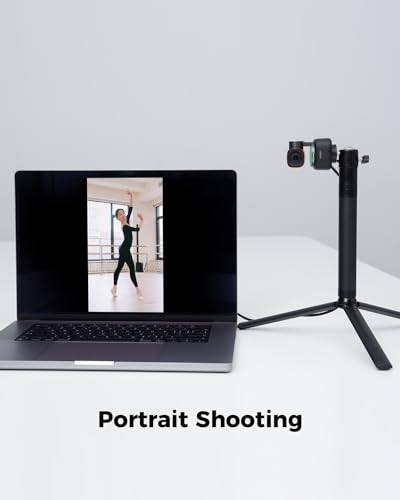
- 【Custom Your Own OBSBOT Tiny 2】Our Computer Camera introduces the Beauty Mode, as well as Desktop Mode, Whiteboard Mode, Portrait Mode, and Group Mode. Our PTZ camera 4K can meet your needs in various scenarios, such as meetings, presentations, live streaming, and teaching. If you are a professional camera enthusiast, great news! Tiny 2 supports SDK, OSC, Stream Deck, and Global Hotkey functions, allowing you to customize your own Webcam experience.
- 【Excellent Adaptability Webcam 4K】Webcam for PC, Laptop, Mac, Tablet, Streaming, Video Calling, Conference, Meeting, Skype/Zoom/FaceTime/Teams/Tiktok, etc. OBSBOT Tiny 2 data transfer supports USB 3.0. 🚩System requirements: Windows 10 or later; macOS 11 or later; Recommended PC configuration: CPU-7th Gen Intel Core i5 Processors or later; RAM-8GB.
- 🚩Due to its powerful performance, TINY 2 webcam may get hot during use, this phenomenon is normal and will not damage any function of the camera, please feel free to use it.
Overview
- Shooting Modes: Landscape/ Portrait/ Up-side-down
- Exposure Control Type: Automatic
- Video Capture Resolution: 4K
- Media Type: NOT Available, Rely on Your PC/Mac
- Zoom Type: Digital
Couldn't load pickup availability
Low stock: 10 left
View full details

Reviews
-
⭐⭐⭐⭐⭐
Megan Foster — Seattle, Washington
I ordered a few setup accessories from Frameora, and they made my desk feel much more organized. The items were easy to use, practical, and helpful for improving my video calls and simple content recording. I would definitely shop here again. -
⭐⭐⭐⭐⭐
Ryan Miller — Austin, Texas
Frameora has a useful selection for anyone building a better camera or streaming setup. I liked that the products were straightforward, easy to install, and worked well with my everyday desk setup. Everything felt practical and well chosen. -
⭐⭐⭐⭐⭐
Olivia Bennett — Denver, Colorado
I picked up a few filming accessories for my home workspace, and they helped make my setup look cleaner on camera. The lighting and mounting tools were simple to adjust, and they made recording videos feel much easier. -
⭐⭐⭐⭐⭐
Nathan Brooks — Portland, Oregon
The products I ordered from Frameora fit nicely into my content creation routine. They helped with better positioning, cleaner organization, and a more reliable setup for video calls and recording. Overall, I’m very happy with my purchase.
Best Items
-
FUDESY 78.7 x 90in Large Collapsible Grey Backdrop Screen, Portable Retractable Pull Up Panel Wrinkle-Resistant Photo Background for Streaming, Video Conference, Photographic Studio - color: Grey, size: 78.7 x 90in
Regular price $398.38 USDRegular priceSale price $398.38 USD -
FUDESY 78.7 x 90in Large Collapsible Green Screen Chroma Key Panel, Portable Retractable Wrinkle Resistant Green Backdrop for Streaming, Video Conference, Tiktok, Auto-Locking Frame - color: Green, size: 78.7 x 90in
Regular price $362.69 USDRegular priceSale price $362.69 USD -
Blue Screen, Collapsible Chromakey Backdrop Retractable Photo Background | 74 x 76in Portable Chroma Key Panel, Wrinkle Resistant, Pull Up, Video Conference, Live Game, Streaming, Photographic Studio - color: Blue, size: 74 x 76in
Regular price $315.38 USDRegular priceSale price $315.38 USD -
FUDESY 78.7 x 90in Large Collapsible Blue Backdrop Screen, Portable Retractable Pull Up Panel Wrinkle-Resistant Photo Background for Streaming, Video Conference, Photographic Studio - color: Blue, size: 78.7 x 90in
Regular price $398.38 USDRegular priceSale price $398.38 USD
FAQ
What kind of products does Frameora sell?
Frameora specializes in camera setup, webcam, and filming accessories. Our store offers products such as webcams, camera mounts, tripods, phone filming accessories, lighting equipment, microphones, cables, adapters, storage cases, backdrops, and small camera accessories.
Are your products suitable for beginners?
Yes. Many Frameora products are designed for everyday users, beginners, creators, online teachers, remote workers, and streamers. Whether you are setting up a simple webcam station or building a more complete filming setup, you can find practical accessories for different needs.
Can I use these accessories for video calls and online meetings?
Yes. Many of our products are suitable for video calls, online meetings, remote work, virtual classes, and conference setups. Webcams, desk lights, microphone accessories, webcam stands, and cable organizers can help create a cleaner and more reliable video call environment.
Are Frameora products good for streaming and content creation?
Yes. Frameora offers accessories that can be used for streaming, video recording, podcasting, tutorials, product demos, short-form videos, and creator desk setups. Products such as lighting equipment, microphones, phone filming accessories, tripods, and camera mounts can help improve your setup.
Do your products work with phones as well as cameras?
Many products are compatible with smartphones, cameras, webcams, or multiple device types, depending on the item. Phone tripods, phone holders, magnetic phone mounts, selfie stick tripods, and phone video rigs are especially useful for smartphone filming. Please check each product description before purchasing.
How do I know if a mount or tripod will fit my device?
Compatibility can vary by product. We recommend checking the product description, size information, mounting type, screw size, and supported device range before placing an order. If you are unsure, you can contact our support team before purchasing.
Can I use Frameora products for a home studio setup?
Yes. Frameora offers many products that are useful for home studios, desk studios, podcast setups, product photography areas, and creator workspaces. Lighting equipment, backdrops, stands, clamps, reflectors, microphones, and mounting accessories can help build a more organized setup.
How long does shipping usually take?
Shipping times may vary depending on product availability, processing time, destination, carrier operations, and order volume. Once your order is processed and shipped, available tracking information will be provided when applicable.
Can I change or cancel my order after placing it?
Order changes or cancellations may not be possible once an order has entered processing or shipment. If you need help with an order, please contact us as soon as possible at klasrtdetyuim@gmail.com. We will review your request based on the current order status.
How can I contact Frameora customer support?
You can contact our customer support team by email at klasrtdetyuim@gmail.com. For faster assistance, please include your order number, the email address used at checkout, and a brief explanation of your request. Our team will review your inquiry and respond as soon as possible.