Skip to product information
1 of 7

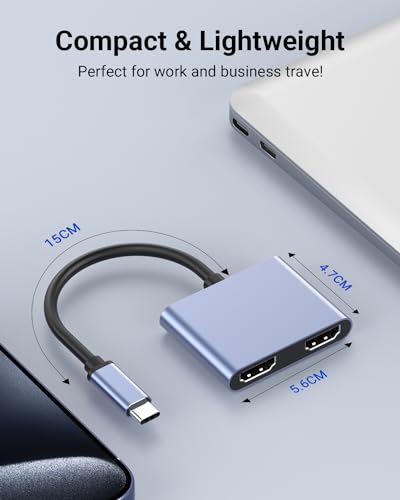
USB C to Dual HDMI Adapter 4K@60Hz, Multiport Adapter with 2 HDMI, USB3.0, PD 100W, USB C Splitter Compatible with MacBook Pro/Air, iPad Pro, Dell, HP, S24/S23/S22

USB C to Dual HDMI Adapter 4K@60Hz, Multiport Adapter with 2 HDMI, USB3.0, PD 100W, USB C Splitter Compatible with MacBook Pro/Air, iPad Pro, Dell, HP, S24/S23/S22

Regular price $25.88 USD
Regular price Sale price $25.88 USD
Sale Sold out
Taxes included.

About this item

  • 【Wide Compatibility Dual HDMI Adapter】This USB C HDMI Adapter is compatible with MacBook/MacBook Pro 2020 2019 2018 2017, MacBook Air 2020 2019 2018, iPad Pro 2018, Dell XPS13/Dell XPS15, Samsung Galaxy S24/23/22/S9/S9+, etc. (Note: NOT for all USB-C port laptop, make sure your laptop or PC supports ” Thunderbolt
  • 【USB C to Dual HDMI Adapter Hub 2 in 1】G GOPALA USB c hub multiport adapter support devices with USB Type C (thunderbolt 3) port to two external monitors to enjoy movies, games with your families on external ultra HD big screen. But note: On Mac devices, support Mirror Mode and Extend Mode, but only SST supported, due to Mac OS limitation; Windows OS supports both SST and MST mode
  • 【Extended & Mirror USB C to HDMI Adapter】Triple Display For Windows System, this triple display dual HDMI monitor adapter support extended mode( ABC mode & ABB mode)and mirror mode(AAA), giving you the flexibility to customize your display setup. For Mac OS system, this USB C to 2 HDMI adapter not support extend 3 different display, but support extended ABB mode((both external HDMI outputs show the same picture) and mirror mode(AAA)
  • 【4K Resolution】This usb c to hdmi adapter resolution up to 4K(3840X2160P@60HZ). When a single HDMI port is working, it is 4K@60Hz(3840X2160P@60Hz); When both HDMI ports are working, it is 1080P@60Hz. (Important: ONLY when your devices support 4K resolution, the video output will be 4K,please make sure to use a HDMI 2.0 cable or better.)
  • 【Plug and Play】This dual HDMI monitor adapter no additional drivers or software required; simply plug the adapter into your USB-C port and connect your HDMI displays for instant setup and seamless operation. Note: NOT for all USB-C port laptops, Make sure your laptop or PC supports ” Thunderbolt 3” or “displayport output mode(DP ALT mode)
  • 【What You Get】G GOPALA USB C to dual HDMI adapter, 12 months support. Feel free to reach our friendly customer service if you have any questions

Overview

  • Brand: G GOPALA
  • Color: Grey
  • Hardware Interface: USB 3.0 Type C
  • Special Feature: Powered
  • Compatible Devices: GOPALA Dual HDMI Adapter Compatible with MacBook/MacBook Pro 2020 2019 2018 2017, MacBook Air 2020 2019 2018, iPad Pro 2018, Dell XPS13/Dell XPS15, Samsung Galaxy S24/23/22/S9/S9+Compatible with MacBook/MacBook Pro 2020 2019 2018 2017, MacBook Air 2020 2019 2018, iPad Pro 2018, Dell XPS13/Dell XPS15, Samsung Galaxy S24/23/22/S9/S9+ GOPALA Dual HDMI Adapter Compatible with MacBook/MacBook Pro 2020 2019 2018 2017, MacBook Air 2020 2019 2018, iPad Pro 2018, Dell XPS13/Dell XPS15, Samsung Galaxy S24/23/22/S9/S9… See more
Quantity

Low stock: 10 left

View full details
  • ⭐⭐⭐⭐⭐

    Megan Foster — Seattle, Washington
    I ordered a few setup accessories from Frameora, and they made my desk feel much more organized. The items were easy to use, practical, and helpful for improving my video calls and simple content recording. I would definitely shop here again.

  • ⭐⭐⭐⭐⭐

    Ryan Miller — Austin, Texas
    Frameora has a useful selection for anyone building a better camera or streaming setup. I liked that the products were straightforward, easy to install, and worked well with my everyday desk setup. Everything felt practical and well chosen.

  • ⭐⭐⭐⭐⭐

    Olivia Bennett — Denver, Colorado
    I picked up a few filming accessories for my home workspace, and they helped make my setup look cleaner on camera. The lighting and mounting tools were simple to adjust, and they made recording videos feel much easier.

  • ⭐⭐⭐⭐⭐

    Nathan Brooks — Portland, Oregon
    The products I ordered from Frameora fit nicely into my content creation routine. They helped with better positioning, cleaner organization, and a more reliable setup for video calls and recording. Overall, I’m very happy with my purchase.

FAQ

What kind of products does Frameora sell?

Frameora specializes in camera setup, webcam, and filming accessories. Our store offers products such as webcams, camera mounts, tripods, phone filming accessories, lighting equipment, microphones, cables, adapters, storage cases, backdrops, and small camera accessories.

Are your products suitable for beginners?

Yes. Many Frameora products are designed for everyday users, beginners, creators, online teachers, remote workers, and streamers. Whether you are setting up a simple webcam station or building a more complete filming setup, you can find practical accessories for different needs.

Can I use these accessories for video calls and online meetings?

Yes. Many of our products are suitable for video calls, online meetings, remote work, virtual classes, and conference setups. Webcams, desk lights, microphone accessories, webcam stands, and cable organizers can help create a cleaner and more reliable video call environment.

Are Frameora products good for streaming and content creation?

Yes. Frameora offers accessories that can be used for streaming, video recording, podcasting, tutorials, product demos, short-form videos, and creator desk setups. Products such as lighting equipment, microphones, phone filming accessories, tripods, and camera mounts can help improve your setup.

Do your products work with phones as well as cameras?

Many products are compatible with smartphones, cameras, webcams, or multiple device types, depending on the item. Phone tripods, phone holders, magnetic phone mounts, selfie stick tripods, and phone video rigs are especially useful for smartphone filming. Please check each product description before purchasing.

How do I know if a mount or tripod will fit my device?

Compatibility can vary by product. We recommend checking the product description, size information, mounting type, screw size, and supported device range before placing an order. If you are unsure, you can contact our support team before purchasing.

Can I use Frameora products for a home studio setup?

Yes. Frameora offers many products that are useful for home studios, desk studios, podcast setups, product photography areas, and creator workspaces. Lighting equipment, backdrops, stands, clamps, reflectors, microphones, and mounting accessories can help build a more organized setup.

How long does shipping usually take?

Shipping times may vary depending on product availability, processing time, destination, carrier operations, and order volume. Once your order is processed and shipped, available tracking information will be provided when applicable.

Can I change or cancel my order after placing it?

Order changes or cancellations may not be possible once an order has entered processing or shipment. If you need help with an order, please contact us as soon as possible at klasrtdetyuim@gmail.com. We will review your request based on the current order status.

How can I contact Frameora customer support?

You can contact our customer support team by email at klasrtdetyuim@gmail.com. For faster assistance, please include your order number, the email address used at checkout, and a brief explanation of your request. Our team will review your inquiry and respond as soon as possible.