Skip to product information
1 of 9

ZealSound Podcast Microphone for PC, Noise Cancellation USB Mic with Gain, Volume Adjustment & Mute Button, Monitoring & Echo, for YouTube, TikTok, Podcasting, Streaming, iPhone, iPad, Android, Mac - color: Black

ZealSound Podcast Microphone for PC, Noise Cancellation USB Mic with Gain, Volume Adjustment & Mute Button, Monitoring & Echo, for YouTube, TikTok, Podcasting, Streaming, iPhone, iPad, Android, Mac - color: Black

Regular price $58.08 USD
Regular price Sale price $58.08 USD
Sale Sold out
Taxes included.

About this item

  • Studio-Quality Sound for Clear Podcast Recording – The K66 USB podcast microphone delivers studio-quality, broadcast-level audio using a high-performance condenser capsule and cardioid pickup pattern that focuses on your voice while reducing unwanted background noise. Designed as a reliable microphone for PC, it features a wide 40Hz–18kHz frequency response and a 46kHz sampling rate to reproduce rich lows, smooth mids, and clear highs for natural, detailed vocals. With –45dB ±3dB sensitivity, it captures balanced sound without distortion during expressive speaking. Ideal for podcasting, voice-over, online classes, meetings, and professional content creation.
  • Intelligent Noise Reduction Mode for Cleaner Podcast Audio – This podcast microphone features an advanced Noise Reduction Mode designed for clearer, more focused voice recording in real-world environments. Press and hold the mute button to enable noise reduction (blue indicator). In this mode, the microphone helps reduce keyboard clicks, PC fan noise, air conditioner hum, and background chatter. Default Mode maintains a warm, natural vocal tone for quiet spaces. Designed as a reliable microphone for PC, it allows creators to identify the active mode instantly and adapt as needed, ensuring clear audio for podcasting, gaming, streaming, online classes, meetings, and recording.
  • True Plug-and-Play USB Microphone with Wide Device Compatibility – Engineered for effortless plug-and-play use, the K66 USB microphone requires no drivers, apps, or software installation. Simply connect and start recording on Windows PC, Mac, laptops, PS4, PS5, and tablets. Included USB-C and Lightning adapters ensure seamless compatibility with iPhone, iPad, and modern USB-C phones and devices, making it easy to switch between desktop and mobile recording. Ideal for creators working across multiple platforms, this microphone delivers consistent, high-quality audio for YouTube, TikTok, Twitch, Zoom, Discord, OBS Studio, Streamlabs, podcasting, livestreaming, and professional voice recording.
  • Real-Time Zero-Latency Monitoring with Adjustable Volume Control – This podcast microphone features real-time, zero-latency monitoring through a built-in 3.5mm headphone jack, allowing you to hear exactly what’s being recorded without delay. Designed as a reliable microphone for PC, it includes a dedicated monitoring volume control that lets you adjust headphone listening levels independently for accurate and comfortable audio monitoring. Real-time feedback helps identify distortion, background noise, or uneven volume before it affects your final recording, making this podcast microphone ideal for podcasting, streaming, online teaching, voice-over work, and professional content creation.
  • Precision Audio Adjustment Knobs for Full Sound Control – This podcast microphone gives creators hands-on control with dedicated knobs for microphone volume, monitoring volume, and echo adjustment. Fine-tune mic gain to maintain clear, balanced vocal output, adjust headphone monitoring levels independently for comfortable listening, and add or reduce echo to enhance depth and presence. Designed as a reliable PC microphone, these intuitive physical controls allow fast, on-the-fly adjustments without software, helping identify distortion, background noise, or level inconsistencies instantly. Ideal for podcasting, streaming, ASMR, voice-overs, singing, and professional multi-platform recording.
  • Instant Mute with Clear LED Indicator – The built-in instant mute button provides fast, discreet audio control with a single press, making it easy to mute yourself during podcast recording, Zoom meetings, Discord calls, livestreams, gaming sessions, interviews, and online classes. A clear red LED indicator shows mute status at a glance, helping prevent accidental audio transmission and protect privacy. Ideal for podcasters, remote workers, educators, streamers, gamers, and content creators who need reliable, quick-access mute control.
  • Adjustable Echo Control for Creative or Clean Recording – The dedicated echo control knob allows you to add subtle ambiance or richer vocal depth in real time, enhancing your voice for livestreams, performances, and creative recordings. Easily reduce or turn off echo when clean, natural sound is required for podcast recording, voice-over, or meetings, or increase it for more expressive delivery during singing, gaming, or live interaction. This built-in control eliminates the need for external software or effects, making it easy to customize your sound instantly. Ideal for podcasters, streamers, voice actors, and PC-based creators who want flexible sound shaping without complicated setup.
  • 360° Rotatable Top-Addressed Design with Stable Metal Base – Designed as a top-addressed podcast microphone, the K66 captures optimal sound when you speak directly into the top, ensuring clear and consistent voice pickup. The 360-degree rotatable body allows flexible positioning to suit different desk setups, angles, and recording styles. Its solid metal construction and weighted base provide excellent stability and vibration resistance, helping reduce unwanted movement during recording or streaming. Designed as a reliable mic for podcasting, this durable, adjustable build supports comfortable long-term use for podcasting, voice recording, online classes, and professional content creation.
  • All-in-One Microphone Solution for Every Type of Creator – Built to support creators at every level, the K66 microphone combines a cardioid pickup pattern, wide 40Hz–18kHz frequency response, intelligent noise reduction, and zero-latency monitoring into one reliable microphone. Compatible with popular platforms and software including OBS Studio, Streamlabs, Discord, GarageBand, Audacity, TikTok, YouTube, and more, it integrates seamlessly into any recording or livestream setup. Whether you’re producing podcasts, teaching online courses, streaming gameplay, creating ASMR content, or recording vocals, this microphone delivers consistent, professional performance across all use cases.
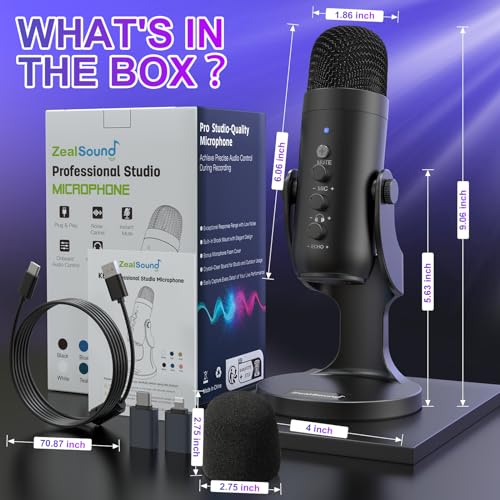
  • Complete Accessory Package for Instant Professional Setup – The K66 podcast microphone includes a full accessory package designed for immediate, hassle-free use. Inside the box, you’ll find a professional-grade microphone, a solid metal anti-vibration stand base for stability, a long 70.87-inch USB audio cable, a USB-C adapter for modern devices, a Lightning adapter for iPhone and iPad, and a foam windscreen to help reduce plosive noise. A user manual and free technical support are included to ensure smooth setup and long-term reliability, providing a complete, ready-to-use recording solution for PC and mobile creators.

Overview

  • Recommended Uses For Product: Gaming & Live Interaction – gaming communication, voice chat, Discord calls, multiplayer gaming, live interaction, PC gaming setup, PlayStation gaming, console audio, headset alternative, streaming gameplay, commentary voice, clear chat audio, gamer setup, competitive gaming, casual gaming, online interaction, real time response, immersive experience, player communication, Music, ASMR & Creative Audio – ASMR recording, vocal performance, singing practice, acoustic recording, sound creativity, expressive voice, ambient audio, sound experimentation, creative recording, home recording, desktop microphone, microphone for PC, music creators, ASMR artists, singers, hobbyists, creative users, audio exploration, personal projects, studio sound, Online Meetings & Remote Work – remote meetings, work from home, online classes, virtual teaching, Zoom calls, video conferencing, business calls, professional audio, clear communication, office setup, home office, PC microphone use, educators, teachers, students, remote workers, corporate users, presentations, webinars, online training, virtual collaboration, speech clarity, background control, Podcasting & Voice Recording – podcast recording, podcast microphone, microphone for PC, spoken voice, solo podcast, interview podcast, narration audio, voice over, audiobook narration, dialogue recording, clear vocals, home studio, desktop setup, PC creators, Mac users, podcasters, interviewers, storytellers, voice professionals, long recording sessions, consistent sound, natural tone, clean capture, studio workflow, content production, Streaming & Content Creation – live streaming, content creation, YouTube recording, TikTok videos, livestream audio, creator setup, PC streaming, desktop recording, OBS Studio, Streamlabs use, commentary audio, creator voice, streaming microphone, microphone for PC, influencers, streamers, video creators, online broadcasters, creative workflow, real time audio, consistent output Gaming & Live Interaction – gaming communication, voice chat, Discord calls, multiplayer gaming, live interaction, PC gaming setup, PlayStation gaming,… See more
  • Brand: ZealSound
  • Model Name: K66 Microphone Series
  • Connectivity Technology: USB / USB-C / Lightning Connector
  • Connector Type: Lightning, USB / USB-C
  • Special Feature: USB Plug-and-Play, Noise Cancellation, Gain and Volume Control, One-Touch Mute, Real-Time Monitoring, Echo Adjustment, Wide Device Compatibility USB Plug-and-Play, Noise Cancellation, Gain and Volume Control, One-Touch Mute, Real-Time Monitoring, Echo Adjustment, Wide Device Compat… See more
  • Compatible Devices: Computer / Laptop / Desktop / MacBook / Chromebook, PS 4 / PS 5, USB-C Devices, iPhone / iPad / Smartphones / Tablets Computer / Laptop / Desktop / MacBook / Chromebook, PS 4 / PS 5, USB-C Devices, iPhone / iPad / Smartphones / Tablets
  • Color: Black
  • Included Components: 1 x 70.9-inch USB Cable, 1 x Foam Windscreen, 1 x Lightning Adapter, 1 x Microphone with Stand Base, 1 x USB-C Adapter 1 x 70.9-inch USB Cable, 1 x Foam Windscreen, 1 x Lightning Adapter, 1 x Microphone with Stand Base, 1 x USB-C Adapter
  • Polar Pattern: Unidirectional
Quantity

Low stock: 10 left

View full details
  • ⭐⭐⭐⭐⭐

    Megan Foster — Seattle, Washington
    I ordered a few setup accessories from Frameora, and they made my desk feel much more organized. The items were easy to use, practical, and helpful for improving my video calls and simple content recording. I would definitely shop here again.

  • ⭐⭐⭐⭐⭐

    Ryan Miller — Austin, Texas
    Frameora has a useful selection for anyone building a better camera or streaming setup. I liked that the products were straightforward, easy to install, and worked well with my everyday desk setup. Everything felt practical and well chosen.

  • ⭐⭐⭐⭐⭐

    Olivia Bennett — Denver, Colorado
    I picked up a few filming accessories for my home workspace, and they helped make my setup look cleaner on camera. The lighting and mounting tools were simple to adjust, and they made recording videos feel much easier.

  • ⭐⭐⭐⭐⭐

    Nathan Brooks — Portland, Oregon
    The products I ordered from Frameora fit nicely into my content creation routine. They helped with better positioning, cleaner organization, and a more reliable setup for video calls and recording. Overall, I’m very happy with my purchase.

FAQ

What kind of products does Frameora sell?

Frameora specializes in camera setup, webcam, and filming accessories. Our store offers products such as webcams, camera mounts, tripods, phone filming accessories, lighting equipment, microphones, cables, adapters, storage cases, backdrops, and small camera accessories.

Are your products suitable for beginners?

Yes. Many Frameora products are designed for everyday users, beginners, creators, online teachers, remote workers, and streamers. Whether you are setting up a simple webcam station or building a more complete filming setup, you can find practical accessories for different needs.

Can I use these accessories for video calls and online meetings?

Yes. Many of our products are suitable for video calls, online meetings, remote work, virtual classes, and conference setups. Webcams, desk lights, microphone accessories, webcam stands, and cable organizers can help create a cleaner and more reliable video call environment.

Are Frameora products good for streaming and content creation?

Yes. Frameora offers accessories that can be used for streaming, video recording, podcasting, tutorials, product demos, short-form videos, and creator desk setups. Products such as lighting equipment, microphones, phone filming accessories, tripods, and camera mounts can help improve your setup.

Do your products work with phones as well as cameras?

Many products are compatible with smartphones, cameras, webcams, or multiple device types, depending on the item. Phone tripods, phone holders, magnetic phone mounts, selfie stick tripods, and phone video rigs are especially useful for smartphone filming. Please check each product description before purchasing.

How do I know if a mount or tripod will fit my device?

Compatibility can vary by product. We recommend checking the product description, size information, mounting type, screw size, and supported device range before placing an order. If you are unsure, you can contact our support team before purchasing.

Can I use Frameora products for a home studio setup?

Yes. Frameora offers many products that are useful for home studios, desk studios, podcast setups, product photography areas, and creator workspaces. Lighting equipment, backdrops, stands, clamps, reflectors, microphones, and mounting accessories can help build a more organized setup.

How long does shipping usually take?

Shipping times may vary depending on product availability, processing time, destination, carrier operations, and order volume. Once your order is processed and shipped, available tracking information will be provided when applicable.

Can I change or cancel my order after placing it?

Order changes or cancellations may not be possible once an order has entered processing or shipment. If you need help with an order, please contact us as soon as possible at klasrtdetyuim@gmail.com. We will review your request based on the current order status.

How can I contact Frameora customer support?

You can contact our customer support team by email at klasrtdetyuim@gmail.com. For faster assistance, please include your order number, the email address used at checkout, and a brief explanation of your request. Our team will review your inquiry and respond as soon as possible.